Changing free play, deposit bonuses and referrals
Everything in Settings → Free play & deposit bonuses decides how much free play, XP and spins players earn. None of it pays Cash out Amount. Super admins can change things here. Admins can open every tab and read it, but the Edit buttons are not shown to them.
Two rules to keep in mind before you change anything:
- A change only applies to deposits and loads that settle after you save it. Bonuses a player has already earned, or is waiting to claim, stay exactly as they were.
- Days and weeks run on New York time. "First deposit of the day" resets at midnight in New York, not where the player lives.
Changing a base rule
Base rules are what every player gets unless a special scheme says otherwise.
- Open Settings → Free play & deposit bonuses. The Base rules tab lists every rule with its current amount, whether it is On or Off, and who changed it last and when.
- Click Edit on the rule. Change the numbers. Percentages are whole percents. Money is in dollars.
- Choose a Reason (and write a note if you choose Other). Every change is recorded with your name, the reason and the before and after values.
- Click Save.
If someone else changed the same rules while you were editing, you will see "Someone else changed this rule". Click Reload, look at the new values, and make your change again. Nothing was saved from the stale screen.
The daily free play ceiling caps what one player can earn per day from the daily free play only: first and second deposit, several deposits, and the login streak. Those rows are marked Counts toward daily cap. Weekly, monthly and referral rewards always pay in full.
Smallest deposit that counts sets the minimum deposit for any deposit bonus (Min $, between $4.99 and $1,000). A smaller deposit still goes into the wallet, it just earns no deposit bonus.
Weekly deposits → next-load bonus rewards a player who deposits enough in one week: their next load gets a bonus percentage. You set up to five tiers, each with Weekly $ (the week's deposit total), Next load % and Max $ (the cap on that bonus). Each tier needs a higher weekly total than the one before; the highest tier the player reached applies.
Rules that are Off (for example the daily free play ceiling) show a Turn on button. Turning one on needs a reason too.
Every deposit pays a whole percentage of every qualifying deposit as free play, with an optional Most per deposit. It has no switch: it ships empty and reads Off — fill in to turn on; save a percentage and it reads Live now and pays from the next deposit. Empty it again to turn it off. If a deposit also earns the first- or second-deposit bonus, the bigger one is paid, not both. It is not covered by the daily free play ceiling, and schemes cannot change it.
Giving selected players a special scheme
Use a scheme for a promotion, a VIP, a streamer partner or a goodwill offer, so you do not change the amounts for everyone.
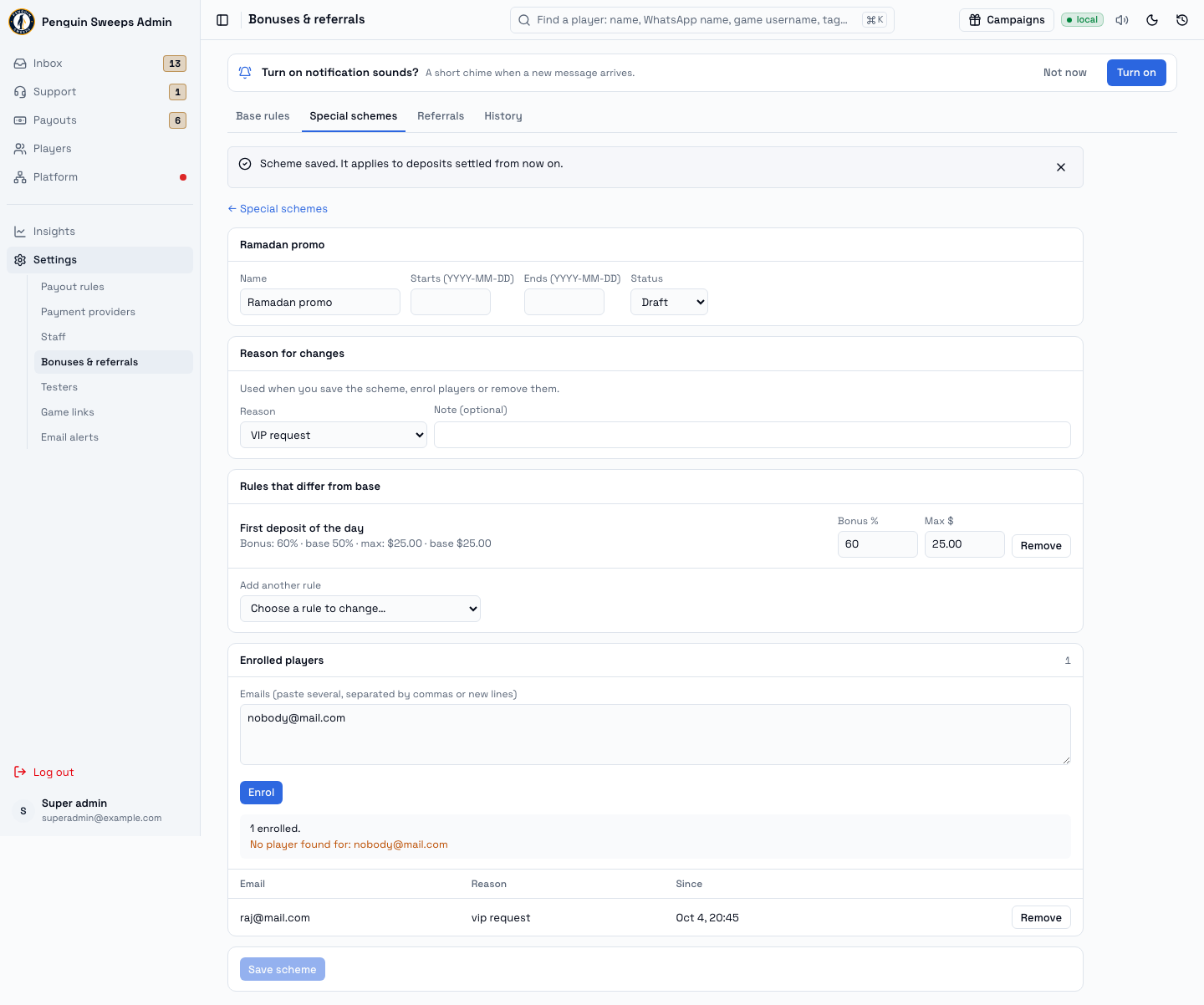
- Open the Special schemes tab and click New scheme. Give it a name. Add start and end dates if it should stop by itself. Leave it as Draft until you are ready; set it to Active to switch it on.
- Under Rules that differ from base, pick Add another rule. The amount starts as the current base value; change what should differ. Each row shows the scheme value next to the base value, for example
25% · base 20%. Click Remove on a row to go back to the base rule for that one. - Choose a Reason for changes and click Save scheme.
- Under Enrolled players, paste one or more emails (separated by commas or new lines) and click Enrol. The result tells you who was enrolled, who was already in the scheme, and which emails matched no player. Nothing is created for an unknown email.
- To take a player out, click Remove on their row. Pick a reason first.
Players get whichever pays more, base or scheme, for each rule. Amounts are never added together. Rules a scheme does not change stay at the base value.
Checking what a player gets
Open the player (Players → the player). The Effective rewards card lists their active schemes and the amount each rule resolves to for them, as the server works it out. If a rule comes from a scheme, the scheme's name is shown beside it.
Referrals
The Referrals tab shows the current reward for the person who invites, what the invited friend gets, and a list of referrers: how many friends they invited, how many made a first load that was rewarded, what those friends loaded, and what the referrer earned and claimed. Search by name, email or referral code. Open a referrer to see each friend, when they joined, their first load and their bonus.
The player and friend IDs are tucked under Technical details at the bottom of a referrer's page; you rarely need them.
The Perks for top referrers table shows the milestone reached after 5, 10 and 20 rewarded friends.
History
The History tab lists every change in plain words, for example First deposit of the day: Bonus 40% → 50%, with who made it, when, and the reason.
Stop and ask for help when
- Someone asks for a bonus that pays out cash, or a bonus with no cap. Both are outside what this tool does.
- You are asked to change amounts "just for one person" by editing the base rule. Use a scheme with that player enrolled.
- A number you typed was rejected and you are tempted to split it across two rules. Ask first.
- The History tab shows a change you did not expect.
Write these down
The request, the rule or scheme you changed, the values before and after, the reason you chose, and for enrolments the list of emails including any that were not found.