Someone paid us outside the app
Sometimes a player pays us in a way the app doesn't know about — Cash App, Chime, PayPal, a bank transfer, cash, crypto. Somebody has to type that in by hand so the player gets their money.
This guide walks you through it. Full detail on every field is in Deposits (money coming in).
The one thing to understand first
What you do depends on who you are:
- Super admin: Record & credit does it in one step. The player has their money the moment you click it.
- Admin: Save draft writes down what happened. Nothing moves. A super admin settles it later, once they've checked the evidence.
A draft is not a payment. If the player asks, say "it's recorded and being checked" — not "it's in". This is the most common way this process goes wrong, and it always ends with an upset player.
What you need before you start
- Admin to record it; super admin to settle, void, or reverse it.
- The player's account, which must already exist.
- The amount in dollars, when it arrived, and how they paid.
- The reference number from the payment app or bank.
- A receipt if you have one — JPEG, PNG, or PDF. Cover up anything on it that isn't relevant.
- A glance at the environment badge at the top of the screen.
Recording and settling: the normal path
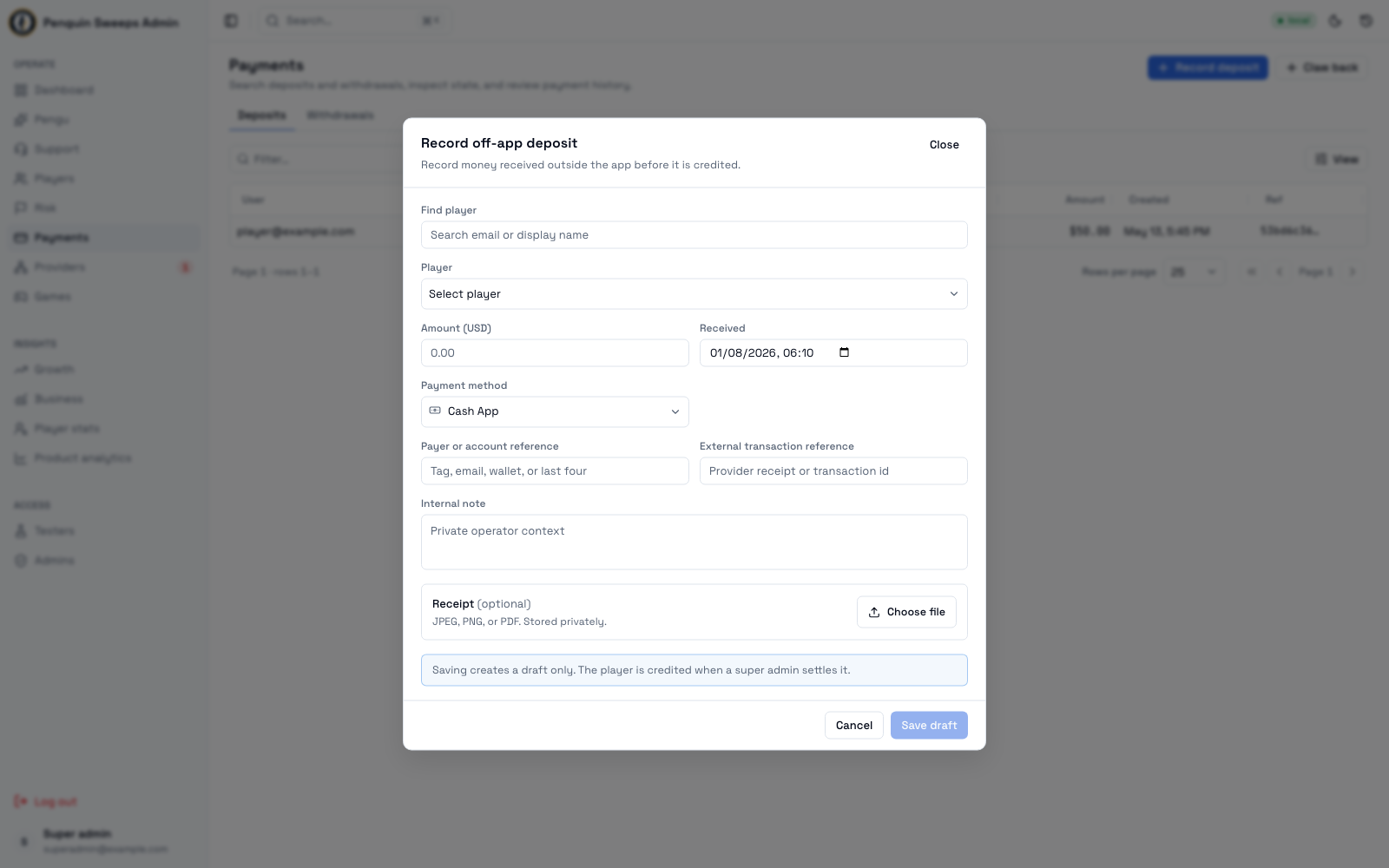
- Start from the player. Open their page and click Record deposit, or press ⌘K, find the player, and choose Record deposit. The sheet opens already filled in with that player. (From
/admin/payments/depositsyou can also click Record deposit and pick the player yourself — read the email properly, similar names are common.) - Type the amount and the reference. The method starts on the one you used last — change it if this one is different. Those two are all most deposits need. The reference is the transaction number or $cashtag from the payment app.
- Optional: the time it arrived, who paid, a private note, and a receipt (JPEG, PNG, or PDF).
- Super admins also pick why you're crediting it now: Payment received (already filled in), Receipt checked, Test credit or Other (Other needs a short note).
- Read the yellow warning if there is one. "Similar: $20.00 Cash App 12 min ago" means this player already has a deposit of the same amount in the last day. If it really is the same payment, cancel — recording it twice credits them twice. If it's genuinely a new one, click It's new, and the button unlocks.
- Click the button:
- Record & credit (super admin): the deposit is recorded and the player is credited, in one audited step.
- Save draft (admin): a draft is created for a super admin to settle.
- Super admins: confirm it. You land on the deposit. Before you tell anyone it's done, check all four: the status says
succeeded, the player's wallet went up, the normal deposit rewards were applied, and the events are recorded. - Admins: hand it over. Tell a super admin the draft is waiting. They open it, check every field against the evidence, click Settle, and then Settle and credit — once. Don't double-click. If nothing seems to happen, wait a moment before touching it again.
Only after the deposit says succeeded is it safe to say the money is in.
The player paid another way, but their checkout is stuck
A player starts a card or crypto checkout, doesn't finish it (or it fails), and then pays you directly — say by Cash App. Their original deposit is stuck in a state like checkout_created or stale_pending, and the money you actually received isn't recorded anywhere. Don't record a separate deposit and leave the stuck one sitting there: use Paid another way, which does both and links them.
Super admin only. Admins see the button greyed out, with the reason.
- Open the stuck deposit (from the player's story, Insights → Deposits, or the Inbox) and click Paid another way → record as off-app.
- The sheet opens with the player and the amount already filled in. Change the amount if what actually arrived was different.
- Type the reference of the payment that arrived — it's required, because it's your evidence — and check the method.
- Pick why from the list (Player paid another way, Provider checkout failed, Test cleanup or Other; a note is required for Other).
- Click Record as off-app & credit. This records the off-app deposit, credits the player, and closes the stuck deposit — all together.
Afterwards the stuck deposit says Replaced by an off-app deposit, with a link to the one that replaced it; the new deposit has a Replaces link going back. Both stay in the history.
If the provider later confirms the original payment, the player is not credited a second time. It opens a case for someone to review.
If you're told "This deposit can no longer be converted", the deposit changed while you were looking at it: it may already be paid, replaced, or closed. Refresh and check its state before doing anything else.
Cancelling a draft that shouldn't exist
If you recorded something that turned out to be wrong — wrong player, duplicate, payment never actually arrived — and it's still a draft:
- Open it and confirm it still says
requested. - Double-check the player hasn't been credited.
- Click Void, pick why (Entered in error, Duplicate entry, Payment never arrived, Player cancelled, Test cleanup or Other), add a note if it helps — "duplicate of payment 4821" beats nothing; Other needs one — then Void draft.
- Confirm it now says
voidedand nothing hit the wallet.
Voiding a draft is safe and normal. If you made an error at the recording stage, this is the clean way to fix it. Don't leave a wrong draft sitting there hoping someone else notices.
Undoing a deposit that already settled
Harder, because real money already moved. Super admin only.
- Open the
succeededdeposit and click Revert deposit. - Read the preview carefully, including anything it flags as a blocker.
- Only continue if the preview says the money and the rewards can be safely unwound. If it flags a blocker — the player already spent it, or the rewards are tangled up with a referral or a mission — stop. Don't work around it. Escalate.
- Pick why (Payment was reversed, Payment never arrived, Duplicate payment, Credited by mistake, Test cleanup or Other), add a note if useful (required for Other), and click Confirm reversal once.
- Confirm it shows
reversed, the balancing entries are there, and the attempt is recorded.
The original deposit stays in the history. That's intentional. Nothing is ever erased here.
Stop and ask for help when
- The player, amount, method, reference, or receipt don't match each other.
- The status is
unknown_requires_reconcileorfailed_internal— unless you know the player paid another way, in which case use Paid another way above. - The status changed while you were looking at it — someone else may be working on the same record.
- The reversal preview flags spent money, or reward, referral, or mission blockers.
- The evidence you've been given contains passwords, card numbers, or another player's information.
None of these mean you did anything wrong. They mean this one needs a second pair of eyes, which is exactly what the process is for.
Write these down
Payment ID, player ID, external reference, receipt/proof ID, your name, the reason you gave, the IDs of anything that resulted, and the support conversation if there is one.
If you hand this over halfway through, that list is the difference between a colleague picking it up in two minutes or two hours.