Deposits (money coming in)
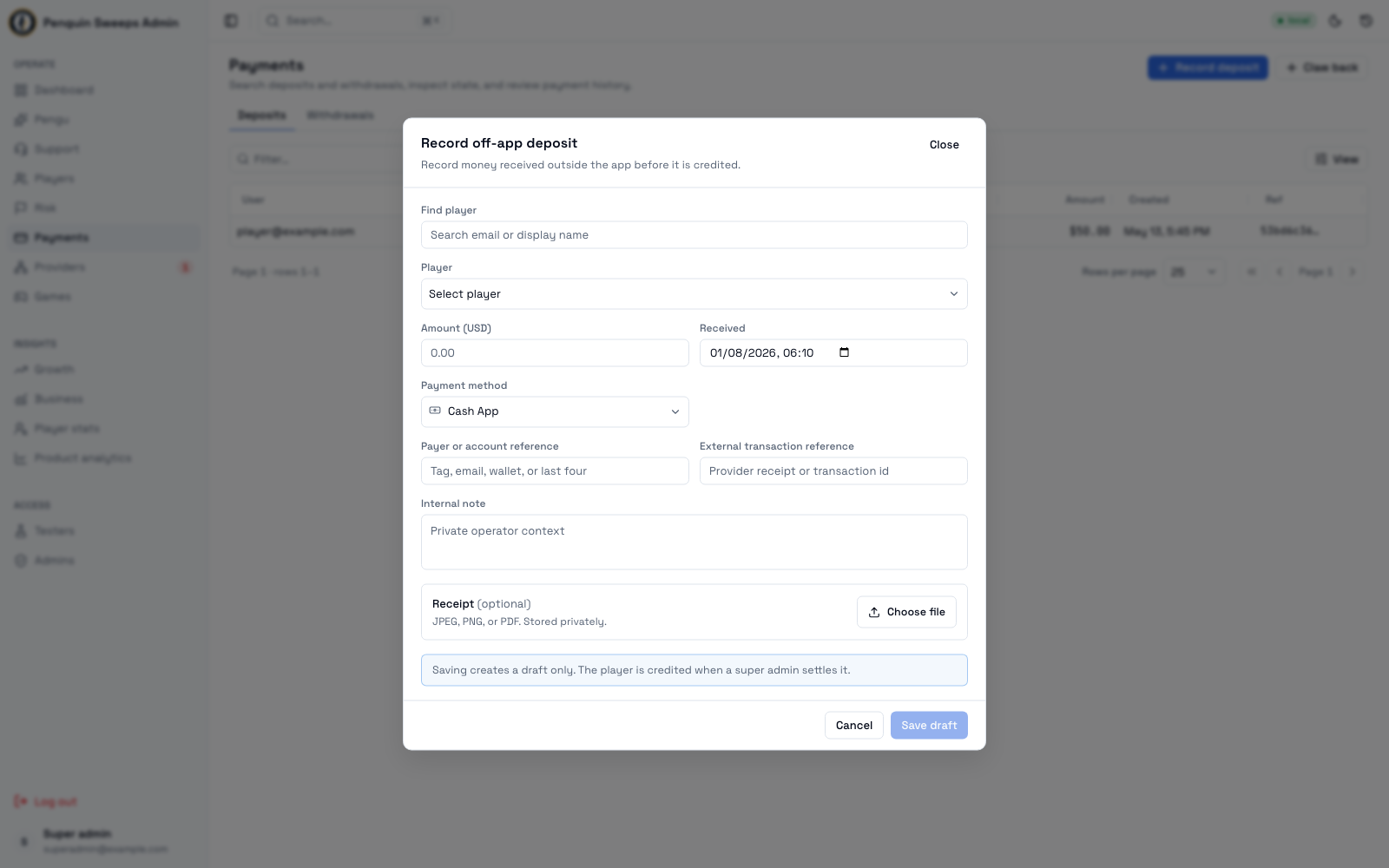
A deposit is a player putting money in. Most happen by themselves through the app. Some come in another way — the player sends cash, uses Cash App, or pays by bank transfer — and someone has to type those in by hand. Those are called off-app deposits, and they're most of the work on this screen.
Getting here
- All deposits — Insights → Deposits,
/admin/deposits. A read-only list for accounting: filters, search and paging, no buttons. - One deposit —
/admin/payments/detail/:paymentId. Open it from the Deposits list, the Inbox, a player's story or ⌘K. Back to Deposits returns to the list.
Admins can look at deposits, save hand-entered drafts, edit them, and view receipts.
Super admins can record and credit a deposit in one step, settle other people's drafts, void and reverse deposits, record a stuck provider deposit as paid another way, and take money back with Revert deposit. In other words: an admin writes down what happened; a super admin makes it real.
Reading the list
Columns: User, State, Tier, Provider, Source, Amount, Created, Ref.
You can filter by provider and state. Two filters are on by default to keep the noise down: abandoned deposits and internal system deposits are hidden. If a total looks too small, check the filters before assuming records are missing.
Click a row to open it. You'll see the provider's references and a timeline of what happened, with sensitive details hidden.
The list has no action buttons. To record a deposit, start from the player: Record deposit on their page, or ⌘K → the player → Record deposit; the sheet then starts with that player filled in.
The buttons on a hand-entered deposit
Which ones you see depends on the state it's in:
- View receipt — when a finished receipt has been attached
- Edit draft — while it's still
requested, i.e. not yet real - Settle and Void — super admins, while it's still
requested - Revert deposit — super admins, once it's
succeeded - Paid another way → record as off-app — on a provider deposit that was never credited and is still open. Super admins only; admins see it greyed out with the reason.
What each status means
The most important thing to understand: requested is a note. succeeded is money.
| Status | In plain English |
|---|---|
requested | Someone has written down that a payment came in. The player has not been credited yet. |
player_pending | The player has started paying, but it hasn't completed. |
kyc_required | The payment company needs identity checks before it can continue. |
checkout_created | A checkout session has been opened. |
provider_created | The payment company has a transaction on their side. |
succeeded | Done. The money landed and the player's wallet has been updated. |
failed | It didn't go through. |
stale_pending | It's been sitting unfinished too long. Someone should look. |
unknown_requires_reconcile | We don't know what happened. Don't guess, don't retry. Investigate or escalate. |
failed_internal | Something broke on our side. Needs investigating before anything else is done. |
voided | A draft that was cancelled. No money moved. |
reversed | A deposit that was real, and has since been undone with a balancing entry. |
superseded | Shown as "Replaced by an off-app deposit". A stuck provider deposit that the player actually paid another way. It was closed without crediting and links to the off-app deposit that replaced it. |
abandoned | Closed as never paid (shown as Closed - never paid). A super admin closed it out from the Inbox. No money moved. See Closing out stale deposits. |
Recording a payment that came in outside the app
- Click Record deposit — on the player's page, in ⌘K after picking the player, or in the Support player panel. The sheet opens already filled with that player; if you opened it without one, pick the player and double-check it's the right person, similar names are common.
- Fill in:
- Amount in US dollars
- Method — Cash App, Chime, PayPal, Card, Bank, Crypto, or Other (type the method in). It starts on the one you used last.
- Reference — the transaction number or $cashtag from the payment app
- Optionally: when the money arrived, who paid / which account, a note for the team, and a receipt (JPEG, PNG, or PDF)
- If a yellow "Similar: …" warning appears, the same player has a deposit of that amount from the last 24 hours. Cancel if it's the same payment; click It's new if it isn't.
- Click the button:
- Record & credit (super admin) records and credits in one audited step. The player has their money straight away.
- Save draft (admin) creates a draft. The player has not received anything yet. Don't tell them the money is in. A super admin has to settle it first.
Paid another way (a stuck provider deposit)
Super admins only. On a provider deposit that was never credited and is still open (checkout created or stale, provider pending, player or ID check pending, or awaiting review), Paid another way → record as off-app opens the same sheet with the player and amount filled in. You give the reference of the payment that arrived, and why.
One click records the off-app deposit, credits the player, and moves the stuck deposit to superseded. Each links to the other ("Replaced by …" / "Replaces …"). A later provider confirmation of the stuck deposit does not credit again; it opens a case. If the deposit has changed state meanwhile, you're told it can no longer be converted and nothing is recorded.
Settle, void, reverse
Settle and credit — this is the real one. The player's cash goes up and any normal deposit rewards are applied.
Void draft — cancels a draft that shouldn't have been created. You pick why from a short list (a note is required only for Other). Nothing financial happens.
Confirm reversal — undoes a deposit that already settled. You pick why from a short list (a note is required only for Other), and the system has to agree it's safely reversible with no blockers. It posts a balancing correction rather than erasing anything.
Secure preview — opens a receipt through a temporary link, so receipts aren't sitting on a permanent public address.
Before you act
- To create a draft you need a real player, a positive dollar amount, a sensible received time, and the payment method details.
- Before settling, look at the actual evidence — the receipt, the reference, the amount. Settling is the moment it becomes real.
- Reverting only works if the system's preview says the deposit can safely be unwound.
Please be careful
Saving a draft is not crediting a player. If a player asks whether their money's in, the honest answer at draft stage is "it's recorded and being checked", not "yes". Promising too early is the fastest way to a very unhappy conversation later.
Settle, void, and reverse move real money. Every time, check: the right player, the right amount, the receipt in front of you, the external reference matching, and the right environment badge.
Reversing doesn't delete anything. The original deposit stays in the history forever, with a balancing correction next to it. This is on purpose — mistakes stay visible so they can be fixed properly.