Testers and staff accounts
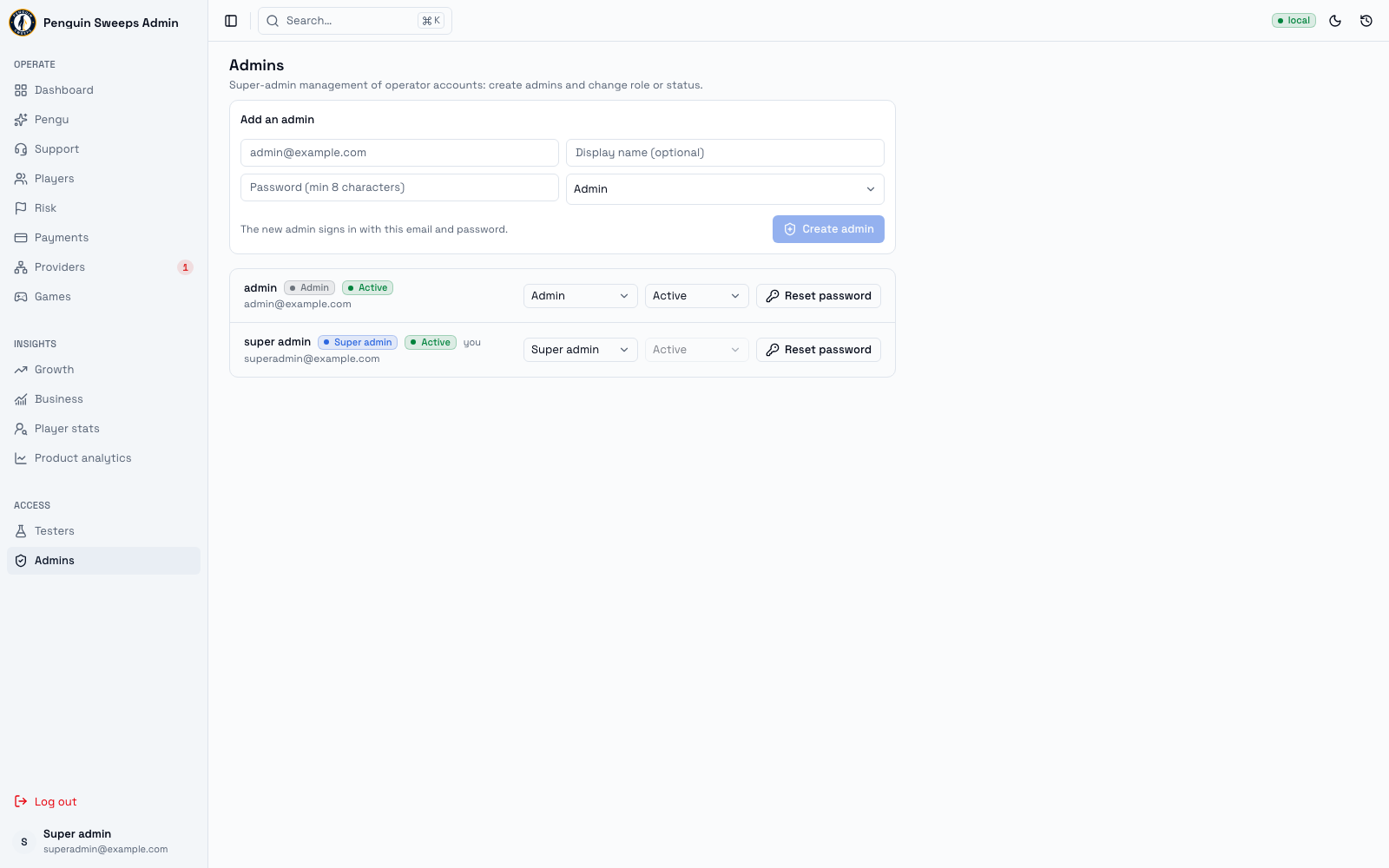
Two related jobs on two screens: marking a real account as a tester, and managing the staff accounts that can get into the admin tool at all.
Getting here
- Testers —
/admin/testers. Admins and super admins. - Staff accounts —
/admin/admins. Super admins only. If you're an admin and you open the link directly, you'll get a friendly "no access" notice rather than an error.
Testers
A tester is a normal player account flagged as staff/testing, so its activity gets left out of the business reports. Without this, a colleague trying out a game would quietly show up as a real customer in the numbers.
To add one: type their email in the box and click Add tester.
The account has to already exist. This screen doesn't create accounts — it flags one that's already there. If it says the account can't be found, the person needs to sign up first.
The list shows each tester's email and user ID. Remove takes them off the list.
If anything goes wrong (loading, adding, removing), the message appears right there on the screen.
Do check the email before you add or remove. Tester status changes what appears in reports, so the wrong one quietly skews the numbers.
Staff accounts
This is the screen that decides who can get into the admin tool at all. Super admins only, for obvious reasons.
Creating one
Fill in the Add an admin form:
- Email — required
- Display name — optional, but do fill it in; it makes every other screen easier to read
- Password — at least 8 characters
- Role —
AdminorSuper admin
Pick the smaller role that lets them do their job. You can always promote later, and starting narrow is much easier than explaining afterwards why a new starter could move money.
Click Create admin, then check the new row shows the right email, role, and active status.
Changing an existing account
Each row shows the display name, role badge, status badge, and email. Your own row is marked with you.
Role switches between Admin and Super admin.
Status switches between Active, Suspended, and Banned. You cannot change your own status — that's deliberate, so nobody accidentally locks themselves out.
Reset password opens a small form for a new password and a confirmation. When it works, that person is signed out everywhere and will need the new password.
What the labels mean
Role
Admin— can get into the tool and do everyday work, but not the money, reporting, or account controls reserved for super admins.Super admin— everything, including moving money and managing other people's access.
Status
Active— working normally.Suspended— amber. Treat as not currently in service.Banned— red. Shut off.
Before you act
- Adding a tester needs an account that already exists.
- Creating staff needs an email and a password of at least 8 characters.
- Resetting a password needs the two entries to match, each at least 8 characters.
- All the staff-account actions need a super admin session.
What should happen
- Adding a tester clears the box and refreshes the list.
- Removing a tester removes the row.
- Creating staff clears the form and refreshes the list.
- A successful password reset shows
Password updated. If you reset your own password, you may be asked to sign in again straight away — that's normal.
Please be careful
Making someone a super admin is the biggest single thing you can do in this tool. It gives them the ability to move money, run provider tests, read every report, and change other people's access. Before you do it, be sure the request came from someone entitled to make it, and that the email in front of you is exactly the right person.
Never reset someone's password just because they asked in chat. Chat accounts get compromised. Confirm through a channel you trust — a call, a ticket from a system you both use — and keep a record of who authorised it.
Send credentials properly. Never put a password in a support note, a ticket, or a message to the player. Use whatever approved channel your team has for handing over credentials.
Watch out for locking everyone out. You can't suspend yourself, but roles can still be changed. If a change would leave no active super admin, or would cut off the account that recovers access, stop and check with someone before you save.
Check the email character by character. jon@ and jonn@ are one keystroke apart and completely different people.