Cash-outs (money going out)
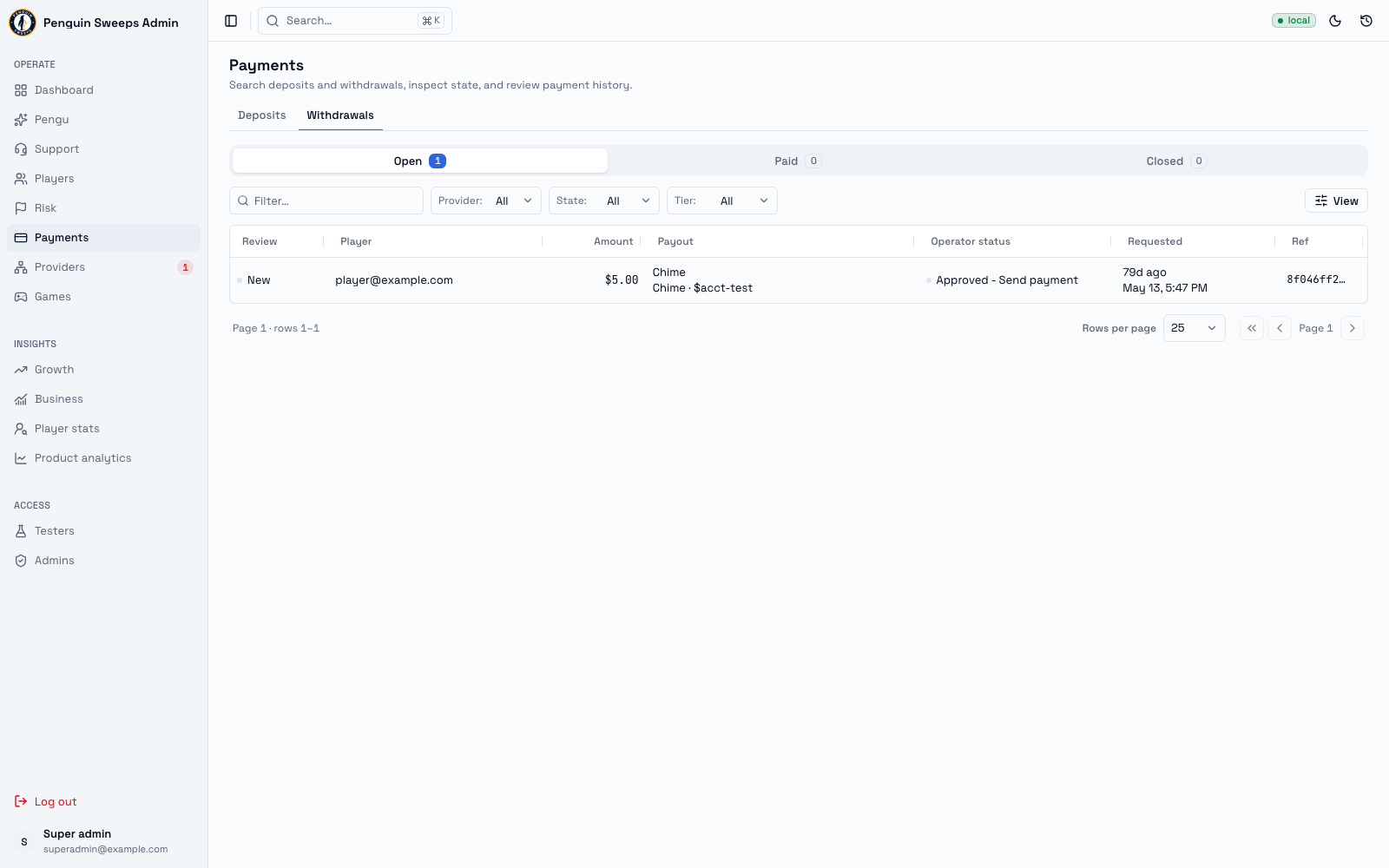
A cash-out is a player asking to be paid. This is the most sensitive screen in the tool, because getting it wrong means either a player doesn't get their money or we pay someone twice.
Take your time here. Nobody is timing you.
Getting here
- Every payout — Payouts,
/admin/payments/payouts(the board, by lane; the lane is kept in?view=). There is no separate cash-outs list. - One cash-out —
/admin/payments/withdrawal-detail/:paymentId. Open it from the Payouts board, the Inbox, a player's story or ⌘K.
Admins can look at cash-outs and open them to read.
Super admins with cash-out-approval permission can actually approve, reject, mark paid, or confirm failed, manage the payment proofs, and see where the player's money originally came from.
The payout lanes
The Payouts board sorts every payout into a lane:
Needs you — waiting for a person to approve, pay or look. First redemptions from linked game accounts that wait for a review are listed here too, after the payouts: the player, First redemption, the game and the credits (Credits not read yet until the game balance was read whole), what it's waiting for, and how long. Click one to open its review. The Payouts count in the sidebar includes them. In flight — automatic payouts being sent. Problems — something went wrong or is unclear. Done — finished, for the date range you picked.
The system decides which lane a payout sits in; you can't move one by hand.
Reading the list
Columns: Review, Player, Amount, Payout, Operator status, Requested, Ref.
"New" in the Review column means nobody has looked at this one yet. When you open it, your name is recorded as the first reviewer. That's it — opening a cash-out doesn't move any money, so please do open things to read them. Being the first person to look is not a commitment to anything.
Operator status is the plain-language summary of what's needed:
- Waiting for approval
- Approved — send payment
- Processing automatically
- Needs attention
- Paid
- Closed
Trust this label. It's worked out by the system from the full picture, and it's more reliable than trying to interpret the technical status yourself.
You can filter by provider, state, and tier. Click a row to open it.
What's on a cash-out's page
- Where the money came from and any risk context (super admins)
- The cash-out facts, its full event history, and any proofs
- What the player has been told
- A notice if this one needs a crypto payment done by hand
- The action buttons that apply right now
Proofs: JPEG, PNG, or PDF, up to 8 MB. Once finished, a proof can be viewed through a secure temporary link.
What each status means
| Status | In plain English |
|---|---|
awaiting_approval | Waiting for a person to approve or reject it. |
dispatch_queued | Approved, queued up to be sent. |
action_required | Either the payment company or a person needs to do something. |
provider_created | The payment company has created the payout on their side. |
succeeded | Paid. Money reached the player. |
failed | The payout failed. |
rejected | A person rejected it, and the reserved money went back to the player's balance. |
canceled | The payout was cancelled. |
expired | The window to approve or act ran out. |
unknown_requires_reconcile | We don't know if the money went out. Needs evidence before anyone touches it. |
failed_internal | Something broke on our side. Investigate first. |
The four decisions
Each one is only available in specific states — if you can't see the button, this isn't the right moment for that action.
Approve & dispatch — only when it's awaiting_approval. You pick why you approved it from a short list; a note is optional unless you pick Other. This queues the payment to be sent; it doesn't itself prove anything arrived.
Reject & release — only when it's awaiting_approval. You pick the category the player sees and a private reason from a short list; a note is optional unless you pick Other. The money the player had reserved goes back to being theirs to spend.
Mark paid — only for a manual payout at provider_created, and only after you've sent the money. Needs the payment confirmation or reference. The fee defaults to the quote, the reason defaults to "Paid as requested", and a proof is needed only when the payout settings require one. The net figure is worked out for you. On the Payouts board a clean manual payout can be approved and marked paid in one step.
Confirm failed & release — only when it's unknown_requires_reconcile, and only with clear evidence from the payment company that nothing was sent. Closes the cash-out and gives the player their money back.
Before you act
- Open the cash-out and let it fully load. Don't act from the list.
- For Mark paid, upload and finish the proof first if your payout settings require one.
- For a manual crypto payout, do the actual crypto transfer first, then come back and record its transaction reference (and the real fee if it differs from the quote). Never record it before you've sent it.
What should happen
- A successful action shows a confirmation, refreshes the page, and writes the whole thing into the audit trail.
- Uploading a proof finishes the file and unlocks the secure preview.
Please be careful
This section is the whole reason the page exists. Read it once properly.
Never decide from the list view. Open it. Check the destination, the gross amount, the fee and net, the payment company's reference, the proof, and who the player is.
"Mark paid" is you personally stating that the money already left and arrived. If it hadn't actually gone out, we now think we've paid someone we haven't — and that's a real hole in the accounts that's painful to find later. Only click it with the proof open in front of you.
"Confirm failed" gives the money back to the player. If the payment did actually go out, they've now been paid twice. Only click it with clear evidence from the payment company that nothing was sent.
If you don't know what happened, that's not a problem to solve with a button. unknown_requires_reconcile means exactly that: unknown. Don't retry the payout. Don't mark it paid because it's probably fine. Don't confirm it failed because it's been a while. Write down what you found and hand it to someone who can get evidence from the payment company. This is genuinely the right thing to do, and nobody will think less of you for it.
If the status changed while you had the page open, stop and refresh. Someone else may be working on the same one.
The reconciliation queue is somewhere to look at evidence. It isn't a way to force something to a conclusion.