Players, wallets, and rewards
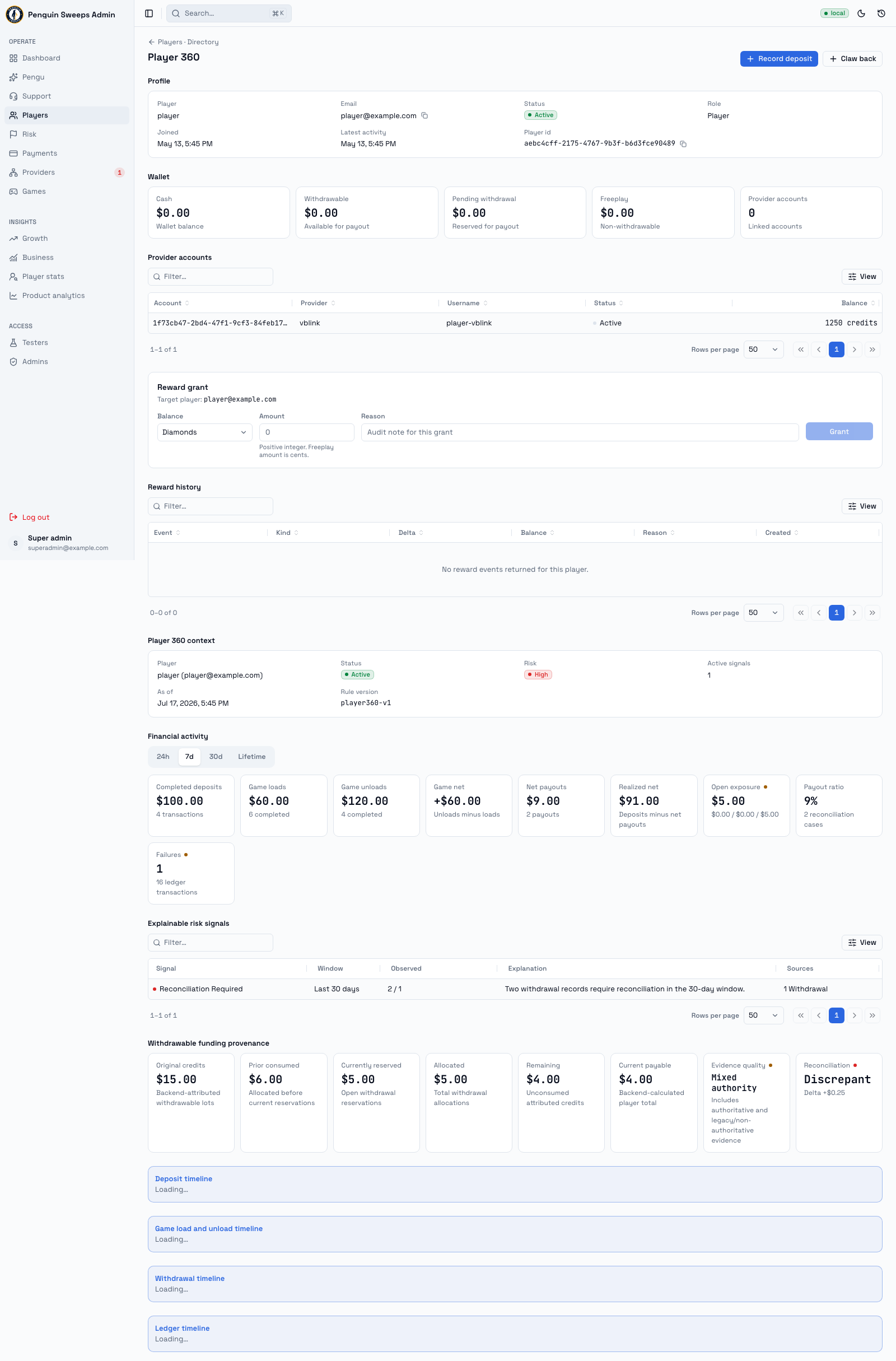
Everything you need to know about one person: who they are, what's in their wallet, what they've done, and what you're allowed to change.
Getting here
- The player list —
/admin/users/directory - One player —
/admin/users/detail/:userId(or just click their row) - The risk list —
/admin/flags/players(super admins only)
Admins and super admins can both browse players and give balances.
Super admins additionally see the risk list, the money and risk panels on a player's page, where a cash-out's money came from, and can take balances away.
Finding a player
The list shows: Player, Type, Status, Wallet, Payments, Last active, Joined.
- Search by name or email in the "Search player…" box.
- Filter by status: All, Active, Suspended, Banned, or Pending verification.
- Internal test accounts (marked System canary) are hidden by default. They aren't real customers — leave them hidden unless you're specifically checking on our own test setup.
Click a row to open that player.
What's on a player's page
Everyone sees:
- Profile — who they are and what state their account is in
- Wallet — what they currently hold, with one Edit button to give or take away
- Provider accounts — their accounts at the game providers
- Reward history — what they've been given before
Super admins also get the fuller picture (the tool calls this Player 360):
- Risk context, with the reasons spelled out rather than just a score
- A money timeline you can set to
24h,7d,30d, orLifetime - Their deposits, cash-outs, game load/redemption transfers, and ledger movements
At the top of the page there's a Record deposit button. Balance changes start from the wallet's Edit.
Changing a player's balances
Click Edit on the wallet. One dialog covers both directions, and it asks what you want to do first:
-
Give — free play, goodwill, or a promo. Under Rewards you can give Free play, Diamonds, XP, and Spin tokens. Cash out Amount can't be given.
- Cash (Playable Cash) records a payment the player already sent off-app (Cash App, Chime and the like) and credits Playable Cash, which is real money, right away. Any admin can do it; there is no draft and no super-admin approval. Enter the amount in whole dollars or ending in .99 (
25.00or24.99), the method, when it was received, a reason and an internal note. When it's done the dialog shows what was credited and the deposit reference.
- Cash (Playable Cash) records a payment the player already sent off-app (Cash App, Chime and the like) and credits Playable Cash, which is real money, right away. Any admin can do it; there is no draft and no super-admin approval. Enter the amount in whole dollars or ending in .99 (
-
Take away — fixing a mistake, or money paid out off-app. Super admins only. You can take away Playable Cash, Cash out Amount, Free play, Diamonds, XP, and Spin tokens one by one, or tick one of two shortcuts:
- Take all money — all Playable Cash, Cash out Amount and free play. XP, diamonds and spin tokens stay.
- Take everything — the money as above, plus all XP, diamonds and spin tokens.
Pending cash-outs stay either way. Both shortcuts use the player's balances as the server has them right now; if there is nothing to take, the dialog says Nothing to take away.
Then:
- Type an amount next to each balance you're changing. Several at once is fine. Money is in US dollars (
5.00); everything else is whole units. - Pick a reason. Giving offers Goodwill, Compensation for a problem, Promotion, Missed reward, Test credit and Other; taking away offers Credited by mistake, Duplicate payment, Deposit reversed, Promotion abuse, Test cleanup, Player asked for it and Other. Add a note if it helps a colleague later; Other needs one. A take-away also needs a reference (ticket, chat or payment ID).
- Read the preview. It shows every balance you're changing, as now → after. A take-away's preview comes from the server, and anything blocking it (not enough balance) is spelled out — don't try to work around it.
- Click Give to … or Take from … once and wait.
From ⌘K, Deduct player balance opens the same dialog on Take away, for the player on screen or one you pick.
Giving only ever adds. It never fixes an underlying problem — so don't use it to paper over a payment or provider issue that's still unresolved. Sort out the real cause first.
If a change doesn't confirm (a lost connection, a server error), the dialog keeps that exact change and offers Retry. Retrying can't apply it twice. When you give several balances and one fails, the ones that went through are already applied and removed from the form.
Reverting one specific deposit
If you're undoing exactly one settled off-app deposit, open that deposit and use Revert deposit instead. It locks itself to that deposit's amounts and must match the original payment and its rewards precisely.
Don't rebuild a revert by hand-typing approximate amounts into Take away. Use the locked mode — it exists so the numbers can't drift.
What the labels mean
Account status: active, suspended, banned, or waiting on email verification.
Risk level: normal (green), elevated (amber), high (red).
Exposure above zero, or a payout ratio above 1 — a flag worth looking at, not a verdict. It means "have a proper look", never "take action automatically".
Needs review on a history row — the related deposit, cash-out, or transfer has a question mark over it and someone needs to investigate.
Open provider panel in an opened story row — the game or payment provider involved has an operator back-office configured, and the link opens it in a new tab so you can check the record there. No link means none is configured.
Before you change anything
- Make sure you've got a real player selected, not a system test account.
- For a take-away, the balance has to be there. The tool won't push anyone below zero.
- Every admin can read the whole player page. Taking balances away needs a super admin session.
Please be careful
Giving and taking away are real money movements and they're permanently logged with your name on them. Before you submit, check the player's ID and email, the amount and its units, your reference, your reason, and the environment badge.
Player 360 tells you things; it doesn't decide things. Every judgement is still yours.
Reviewing risk
The Risk queue shows outstanding evidence reviews, with provider-operation problems distinguished from player-risk signals. A failed provider request alone does not prove that a player did anything wrong.
Every decision asks why, from a short list: Reviewed, no issue, Known player, Expected activity, False positive, Waiting for information, Keep monitoring or Other (which needs a note). The history shows each decision with its reason, and the review shows how old its evidence is: evidence is refreshed in the background, and your decision applies to the snapshot you see.
- Add a note records your investigation without settling money.
- Acknowledge records that you reviewed the evidence and chose no further action. The same evidence will not return as new work on every refresh.
- Snooze returns the review to attention when its snooze period expires.
- New evidence can reopen a reviewed case, and evidence that goes away clears it. Those changes appear in the history as Reopened automatically or Cleared automatically by the background refresh. Earlier decisions remain available.
Reviewing a signal does not clear an underlying uncertain deposit, cash-out, or game transfer. Resolve those through the financial case workflow separately.
Suspending or banning a player
Super admins may suspend, ban, or reactivate a player with a mandatory reason. Suspension and banning revoke existing sessions and prevent login and new player financial requests. Reactivation does not restore those old sessions.
These actions do not confiscate balances. Existing payment callbacks and financial recovery continue so money already moving is still accounted for. Moderation decisions are permanently audited; they are not shortcuts for resolving a financial discrepancy.
Nothing ever gets deleted. A take-away or a revert adds an opposite, balancing entry — the original stays in the history forever. That's deliberate: it means an honest mistake is always traceable and fixable. It also means you can't quietly tidy something away, so tell someone if you get one wrong.